Hexo站点与Next主题配置
记录下Hexo站点与Next主题配置以及第三方插件的使用
版本
Hexo 7.1.1
Next 8.19.2
说明
假设项目目录名为 hexo,那么 ./_config.yml 称为 站点配置文件;我的 Next 主题是通过npm方式安装,./node_modules/hexo-theme-next/_config.yml (通过 git clone 下载的在 themes/next/目录下)称为 主题配置文件
只记录改动的地方,没记录的默认值
Hexo站点文件配置
站点信息
1 | # Site |
title:网站标题subtitle:网站副标题description:网站描述keywords:网站关键字author:作者language:语言timezone:时区
URL
1 | # URL |
url:网址permalink:文章的永久链接,我这里改成了 :urlname/,这样我可以在文章最上方以 --- 分隔的区域内添加 urlname: 来自定义链接
举个例子,demo.md 文件内容为:
1 | --- |
那么 demo.md 文章的永久链接为 https://www.gaoyuanqi.cn/python/
写作
1 | # Writing |
new_post_name:新文章的文件名称,我这里改成 :year/:month/:title.md 便于文章 在 ./source/_posts/ 目录下按年月分类
举个例子,执行 hexo n 'demo' 命令会创建 ./source/_posts/2024/03/demo.md
部署
1 | # Deployment |
为 Front-matter 自动添加变量
我经常在 Front-matter 也就是文章最上方 以 --- 分隔的区域内添加一些变量:
1 | --- |
我希望能够自动添加这些变量,可以通过修改 ./scaffolds/post.md 来实现:
1 | --- |
这样只要 hexo n 'demo' 就会自动添加了
Next主题文件配置
通过npm安装Next
1 | cd hexo |
主题配置文件 _config.yml 在 ./node_modules/hexo-theme-next/ 目录下
启用Next主题
在 站点配置文件 中修改:
1 | theme: next |
Next样式
1 | # Schemes |
菜单
1 | menu: |
home:首页about:关于tage:标签categories:分类archives:归档schedule:日程表sitemap:站点地图commonweal:公益404badges :显示数目
关闭文章目录序号
1 | toc: |
代码块设置
1 | codeblock: |
light:浅色模式下的样式dark:深色模式下的样式enable:开启一键复制按钮style:代码块样式
头像
1 | # Sidebar Avatar |
url:头像链接放在./node_modules/hexo-theme-next/source/images/ 目录下的头像rounded:true 是圆形头像,false 是正方形头像rotated:为 true 时头像会随着光标旋转,为 false 时头像不会随着光标旋转
标题栏ico
1 | favicon: |
favicon.ico 放在 ./node_modules/hexo-theme-next/source/images/ 目录下
页脚
1 | footer: |
since:建站时间animated:图标动画化
添加百度统计
在百度统计 https://tongji.baidu.com/main/setting/10000202674/home/site/index 添加网站,然后点击 获取代码,复制代码中 js? 之后的值
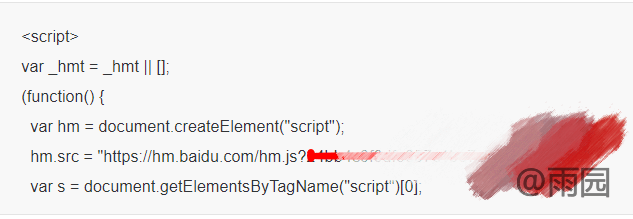
1 | # Baidu Analytics |
添加谷歌分析
访问 https://analytics.google.com/analytics/web/ 右上角找到 跟踪代码管理器 > Google代码 > 代码ID
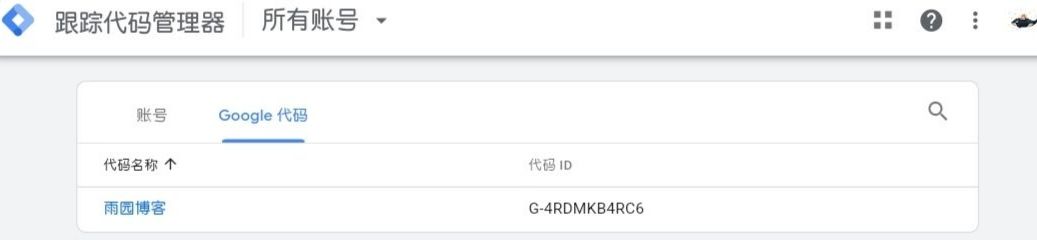
1 | google_analytics: |
##其它问题
Next标签页无法点击或者找不到
hexo目录下执行:
1 | hexo new page "tags" |
然后修改 ./source/tags/index.md :
1 | --- title: tags date: 2024-03-30 17:07:01 |
Next分类页无法点击或者找不到
hexo目录下执行:
1 | hexo new page "categories" |
然后修改 ./source/categories/index.md :
1 | --- title: categories |
插件
添加站内搜索
hexo目录下执行:
1 | npm install hexo-generator-searchdb --save |
站点配置文件 添加:
1 | search: |
Next 主题配置文件 修改:
1 | local_search: |
添加站点地图
hexo目录下执行:
1 | npm install hexo-generator-sitemap --save |
可以两个都安装,也可以选择一个
区别在于前者生成所有网址,后者只有文章网址生成sitemap
然后执行:
1 | hexo clean |
会在 ./public 目录下生成 sitemap.xml 或 baidusitemap.xml